 ENGLISH
  DEUTSCH
  简体中文
简体中文  ESPAñOL
  한국어
한국어 
Settings Assistant 1.1: Faster Configuration, Wider Coverage for 3D Sensing
Settings Assistant 1.1 helps you choose the right scanning profile in seconds, now with friendlier GUI and smart recommendations.
3D sensing has a configuration challenge baked into its physics. The right scan settings for a shiny aluminium casting are wrong for a matte black rubber gasket. The right profile for a brightly lit logistics cell is wrong for a dim warehouse bay.
Exposure, pattern intensity, confidence thresholds, texture sources – the parameter space is large, and the optimal point within it depends on scene properties that vary from one deployment to the next.
 Guided tour of Settings Assistant 1.1
The Problem Settings Assistant Was Built To Solve
For experienced vision engineers, navigating that space is familiar work, if not always fast. For automation generalists, system integrators working outside their core domain, or production teams commissioning a cell without deep 3D sensing expertise, it can be a genuine barrier. Getting a sensor producing good data shouldn’t require knowing which combination of parameters to touch.
Settings Assistant was built to address this directly. Rather than asking users to understand the parameter space, it asks them to evaluate scan results – a task anyone can do by looking at output quality. The tool runs a sweep of configurations, presents the results, and lets the user select the profile that best fits their scene. The optimal settings follow from that choice automatically.
It’s a sound concept, and it has been a meaningful differentiator in the field. The Settings Assistant 1.1 update doesn’t change the concept. It makes the evaluation step faster and more legible.
What’s New in Settings Assistant 1.1 Version
The PhoXi Control 1.17 update delivers two distinct improvements to the Settings Assistant interface, both aimed at reducing the cognitive work required to identify the best profile.
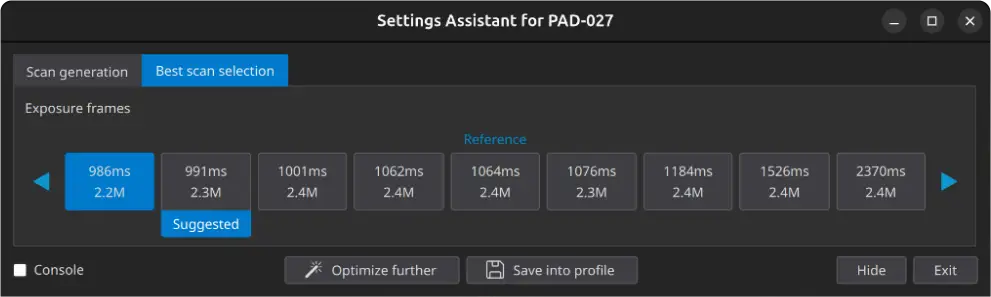
Automatic ordering by scanning time
Previous versions presented scan results in a fixed sequence. Finding the fastest profile that met your quality threshold required either scanning the full set and mentally tracking which result corresponded to which scan time, or iterating manually.
Settings Assistant 1.1 sorts results automatically by scanning time, so the performance landscape is immediately visible. If cycle time is a constraint – and in most production environments, it is – you can now see directly which profiles are competitive and which aren’t, without additional cross-referencing.
Key values displayed per tile
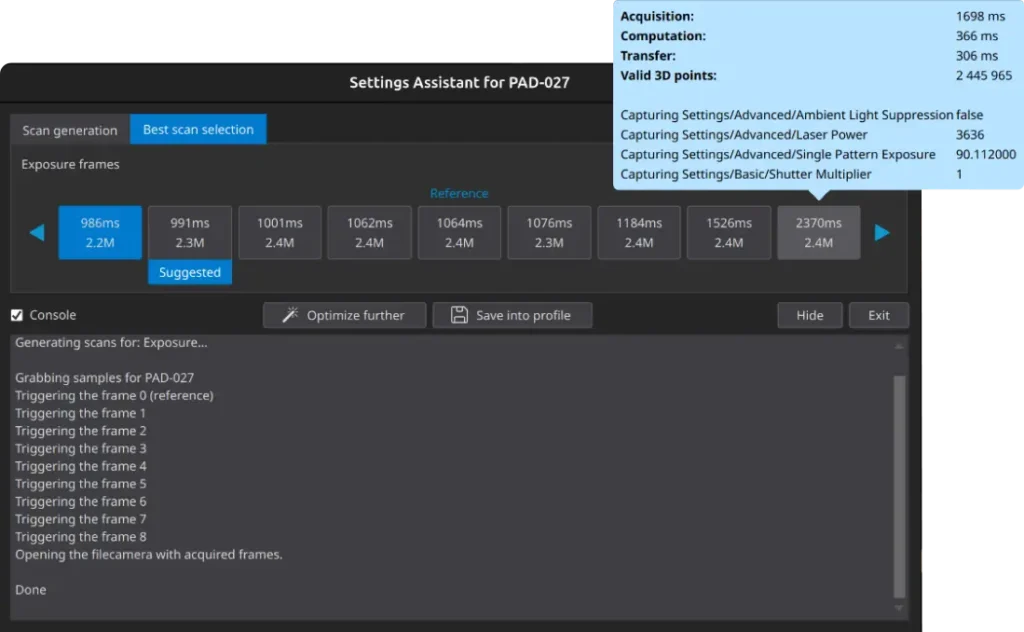
Each result tile in the updated interface now shows two values inline: scanning time and the number of valid 3D points. These are the two most decision-relevant metrics in most configuration workflows. Scanning time tells you whether a profile is fast enough for your application.
Valid 3D point count tells you whether it’s capturing enough of the scene geometry to be reliable. Having both visible without navigating into each result individually means the comparison that previously required mental bookkeeping is now a single glance.
The combined effect is a tighter feedback loop. You run the assistant, you see the ordered results with their key values, you identify the optimal trade-off for your specific scene and cycle time requirement, you select. The expertise required to use the tool well has dropped without any reduction in the quality of the outcome.
Expanded Coverage for Newer Hardware
There’s a second dimension to the Settings Assistant 1.1 update that’s easy to overlook but matters for anyone running current-generation Photoneo hardware.
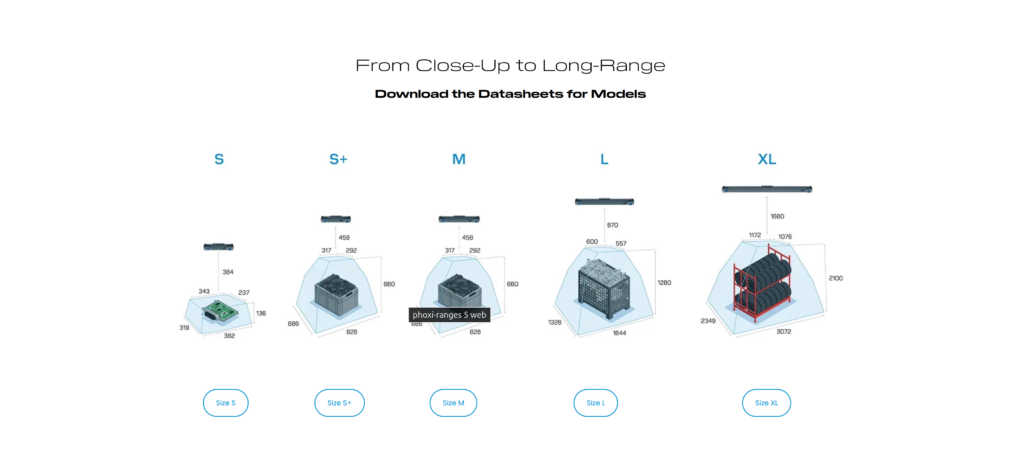
Since Settings Assistant was originally introduced, Photoneo has released new sensor families and a range of new parameters. The assistant previously couldn’t fully leverage these additions – meaning users with newer devices weren’t getting the same guided setup experience that the tool was designed to provide. The new release brings the assistant’s coverage up to date with the current sensor lineup and parameter set.
In practical terms: if you’re working with a newer Photoneo device and found the Settings Assistant results feeling incomplete or not quite optimized for your hardware, that gap is now closed. The full parameter space of current-generation sensors is available to the guided setup workflow.
Who Gains the Most From Settings Assistant 1.1
Settings Assistant 1.1 is most impactful at setup time, which means its value compounds across deployments rather than cycles. Every new cell, every new part type, every commissioning visit where a technician who isn’t a 3D sensing specialist needs to get a sensor producing reliable data – that’s where the improved interface removes friction.
It’s also worth noting the competitive context here. Guided setup tools that meaningfully lower the barrier to correct configuration are not universally available across the industrial 3D sensing market. For end customers evaluating total cost of deployment – not just the hardware cost, but the engineering time required to get to production – this is a tangible differentiator.
If you feel the results could be improved, you can easily store the data from Settings Assistant and share your setup scans with our support team. This gives our experts the exact data they need to help you perfect your profile.
Available Now
PhoXi Control & Firmware 1.17 is available for download. Updated documentation, API references, and working code examples for all supported languages are published at github.com/photoneo-3d, documentation can be found here – docs.photoneo.com.
Check out the Knowledge Base here.


