 ENGLISH
  DEUTSCH
  简体中文
简体中文  ESPAñOL
  한국어
한국어 
PhoXi Control & Firmware 1.17: Simpler Deployment, Faster Downstreaming
Every integration project has the same starting point: a developer, a sensor, and the question of how to get from raw 3D data to a working application as fast as possible. With PhoXi Control & Firmware 1.17, we’re removing the friction from that path, whether you work in C++, C#, Python, or connect through GigE.
This release changes how you interact with Photoneo 3D sensors: more language support, faster AI pipelines, and a GUI that stays out of your way.
More Accessible and Connective
Official PhoXi Python API: Your Language, Our Full Support
PhoXi Control 1.17 release brings a new official option for using Python with our sensors. In addition to the existing GigE implementation, this new alternative provides you with full manufacturer support, long-term maintenance, and complete access to the sensor’s parameter set.
The new PhoXi Python API is an officially supported, fully documented driver that gives Python users the same level of access and reliability that C++ and C# users have had. All device parameters. Full RGB and depth data handling with export to standard formats. Install the package, point it at your device’s serial number, and start scanning.
All API languages now offer full parameter parity, meaning you choose your language based on your team’s preference and tech stack – not based on which features are available where.
Example: Imagine you are tasked with building a custom machine vision pipeline from scratch. Instead of wrestling with unofficial third-party wrappers, you can simply install the official package and start scanning. You get native, reliable access to every single sensor parameter without leaving your preferred Python environment.
GigE: Full Focus, No Compromise
As of a prior release, GenICam GenTL support has been discontinued, leaving GigE as the sole focus for direct protocol-based integration.
The result: your sensor works with any GigE-compliant application, on any platform – including ARM-based systems – without requiring a proprietary driver installation.
If your workflow uses platforms like HALCON, or any standards-compliant vision application, GigE remains your fastest route to integration.
Faster Downstreaming
Faster Time-To-Algorithm For AI Pipelines
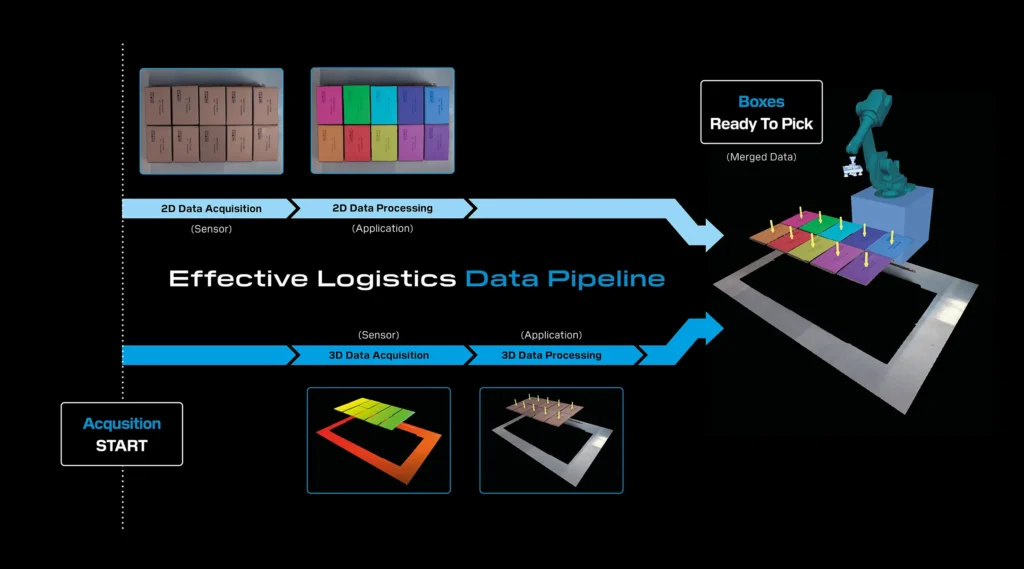
Modern logistics and bin-picking applications increasingly depend on AI inference – segmentation, classification, object detection – running on 2D RGB data. Until now, the capture pipeline delivered 3D data first and RGB second. For AI-driven workflows, that order was backwards.
Early Transfer flips the pipeline. You can now receive the RGB texture first and begin AI processing immediately – segmentation, inference – while the 3D point cloud is still being captured and processed on the device. Once both are ready, the full 3D data pipeline completes.
The impact is straightforward: the AI processing time that previously added to your cycle now runs in parallel with 3D capture. For applications where inference takes tens to hundreds of milliseconds, this can shave significant time off every single cycle.
Example: Imagine you are running a high-speed robotic bin-picking cell that relies on AI object detection. Previously, your system had to sit idle, waiting for the heavy 3D point cloud to generate before your AI could even look at the 2D image. With Early Transfer, you get the 2D RGB texture instantly. You can run your AI segmentation model to locate the part while the 3D depth data is still compiling in the background—recovering critical cycle time on every single pick.
Accelerated 3D Data Reprojection
This update delivers a 70% cut in 3D data reprojection, leading to much faster downstream applications.
Processing overhead for 3D data reprojection has been slashed by more than 70% in standard configurations (when using Camera Space = ColorCamera or CustomCamera).
Aligning 3D point clouds with 2D color cameras or custom camera spaces is computationally heavy and often acts as a bottleneck in overall cycle times.
This provides blistering speed by freeing up massive computational resources, enabling much faster point cloud delivery to downstream applications. Additionally, it offers seamless multi-camera alignment, allowing integrators to use color mapping without paying a heavy performance tax.
Parallel Color Processing & Advanced Denoising
The on-device color image processing pipeline now executes in parallel with 3D data acquisition. Additionally, a new edge-preserving denoising algorithm has been introduced across almost all resolution options.
Sequential processing slows down throughput. Furthermore, noise in color images can confuse downstream vision algorithms, requiring heavy post-processing.
This approach results in reduced capture time, as running 2D and 3D acquisitions simultaneously significantly drops the overall time to capture the scene. It also delivers sharper, cleaner visuals; the edge-preserving denoising algorithm provides pristine color images right out of the box, improving the accuracy of any downstream AI or color-based sorting algorithms.
Enhanced Ease of Use
Settings Assistant 1.1: Find the Right Profile, Faster
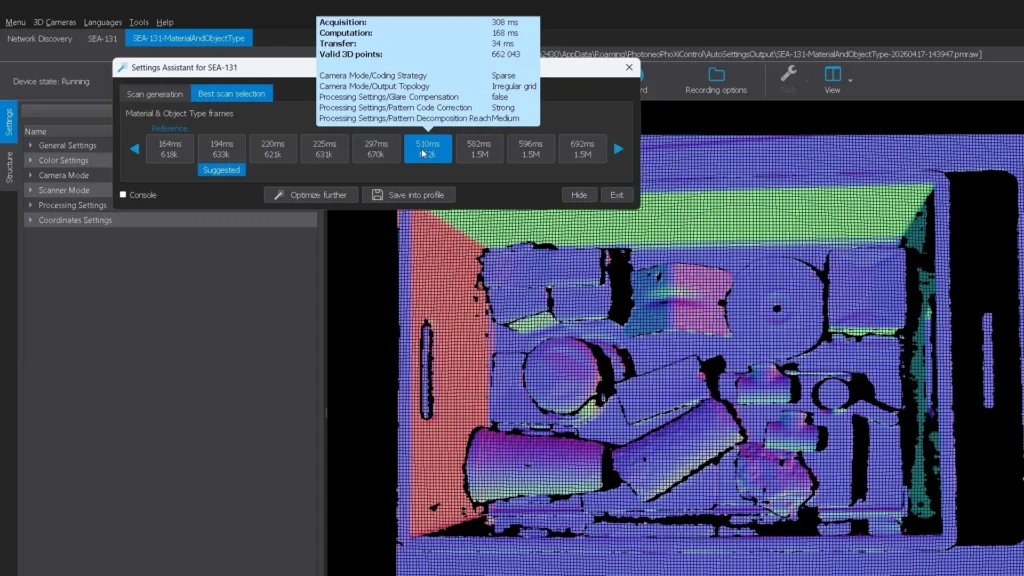
The Settings Assistant has been one of our most appreciated features, a way for users at any experience level to find optimal scan settings without deep 3D sensing expertise. This version makes it sharper.
The redesigned interface now automatically orders scan results by scanning time and displays key metrics – scanning time and number of valid 3D points, directly on each tile. Instead of clicking through profiles and comparing manually, you see your options ranked and quantified at a glance.
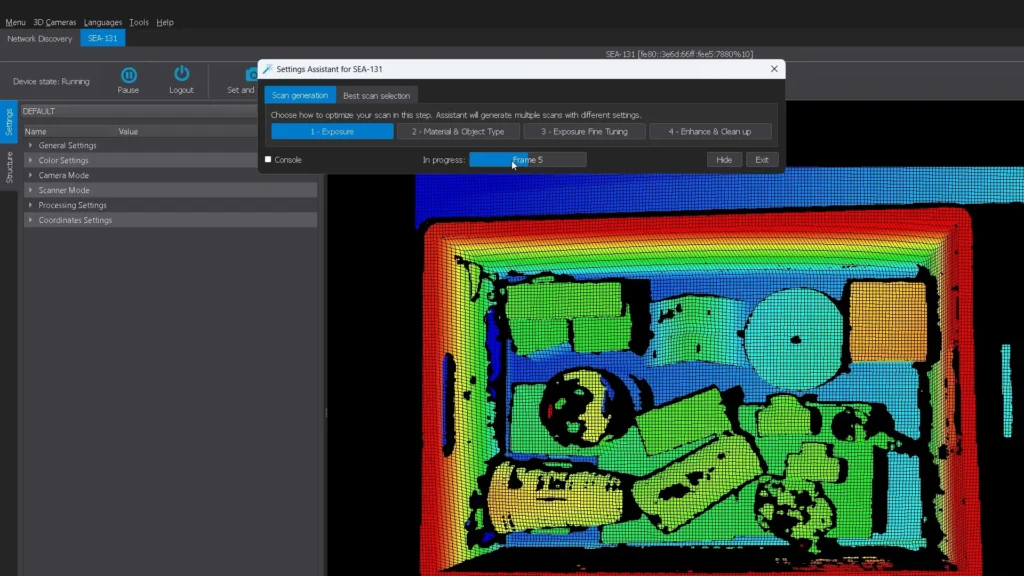
We’ve also expanded Settings Assistant to support the newest generation of Photoneo 3D sensors and their latest parameters, so the quick-start experience stays current as our hardware evolves.
3D ROI (Region of Interest) Setup: Visual, Intuitive, Done
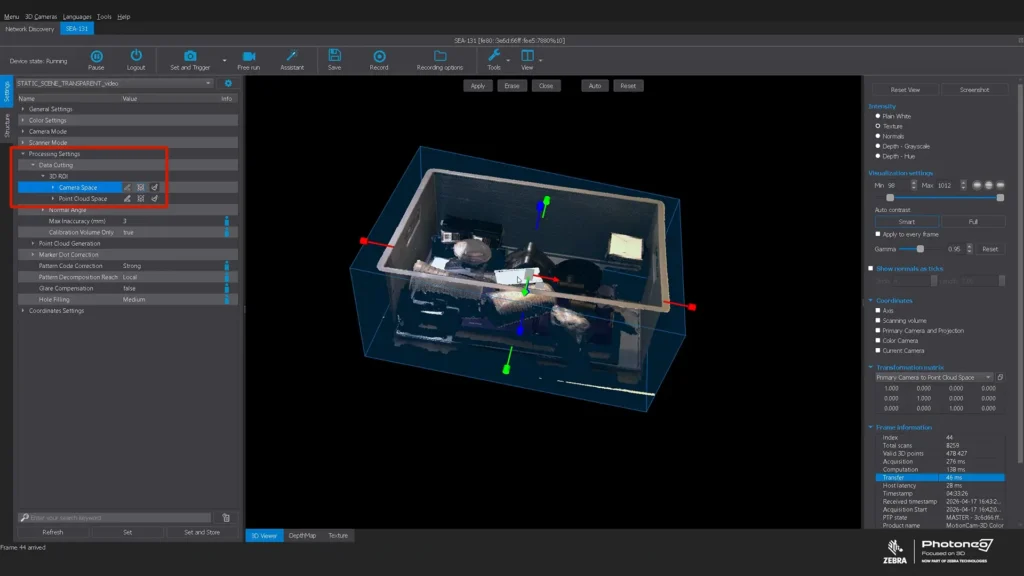
Setting a Region of Interest used to mean typing XYZ coordinates into numeric fields. Now, you get a 3D bounding box directly in the viewer – adjustable along all axes, draggable, resizable – using the same interaction model familiar from tools like CloudCompare.
This is a quality-of-life improvement for anyone using PhoXi Control for development or troubleshooting. Define exactly which portion of the scene matters for your application, visually confirm it, and move on. When that ROI is used downstream, for example, in a Python pipeline, only the relevant data gets processed, speeding up everything that follows.
Example: Imagine you are setting up a sensor and need to isolate a specific tote on a crowded conveyor belt. Rather than using trial-and-error to type raw X, Y, and Z numeric coordinates into tiny text fields, you simply click, drag, and resize a 3D bounding box directly in your viewer. You visually confirm exactly what the sensor should care about, lock it in, and move on.
Available Now
PhoXi Control & Firmware 1.17 is available for download. Updated documentation, API references, and working code examples for all supported languages are published at github.com/photoneo-3d, documentation can be found here – docs.photoneo.com.


